Showing posts with label Multimedia. Show all posts

01 April 2016

Capture Those Precious Memories

Alan Stenhouse used LiveCode to quickly build an app that allowed him to capture some precious memories with his father. I'll let Alan tell the story.


"One day when I was going through some old photos with my father, I was getting him to tell me something about them - who was there, where it was, when etc. I realised that I needed to record this easily and store it with the photo. Initially I just thought I wanted to take notes about each photo, but realised it would be great to record his voice recollections as well. Anyway, that afternoon + evening I made the first cut of an app which worked out quite well and I used it the next day successfully with my Dad."


In the screenshot you can see the the main palette window showing the image list with various controls at the top and a text area for taking notes at the bottom. Beside it is the image viewing window. 


The app also allows you to play back the images in a slideshow, automatically playing the spoken memories and displaying any written notes. 

Alan has created an iPad version of the app. He's called it Re-Collections

30 March 2013

Help remote communities create and share stories

Alex Shaw, art gallery director and technology advocate, collaborated with isee-ilearn to create a tool in LiveCode to allow remote communities in Central Australia to develop and share stories for a central repository called italklibrary. Stories are now being created all over the world in various languages to deliver important social messages and engage a younger generation with technology.


28 March 2013

Bring your user interfaces to life

A few years ago Scott Rossi created an impressive video of his work. Scott creates images with graphic design apps and then brings them to life with LiveCode. So when you see one of Scott's UIs working in the video it is all down to LiveCode.


The credits mention Runtime Revolution, it is the former name of LiveCode.

20 March 2013

Build self-contained music samplers

Scott Rossi used LiveCode to build this stand alone music player with integrated slideshow and browser-launching controls.


And this one as well.


17 March 2013

Make a multilingual talking metronome


Alan Stenhouse of Scruff Monkey Software used LiveCode to create BeatSpeak, a multilingual talking metronome for iPhones and iPads.

A simple and elegant digital metronome. It lets you choose the number of beats per bar, adjust the tempo slider or tap along with your favorite song, then hit the big beat number to start or stop.

You can change the language (currently either English or Japanese) as well as the gender of the spoken voice.


12 March 2013

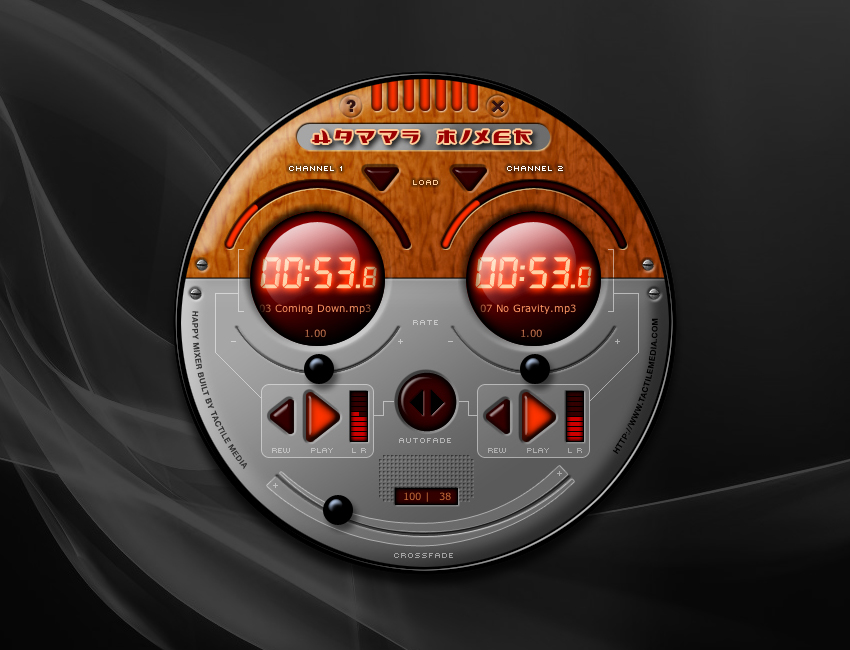
Create a music mixer for kids

A musical toy for mixing playback of two music sources by Scott Rossi in LiveCode.


11 March 2013

Develop the World's largest signing dictionary ... a video dictionary at that!

Tiemo Hollmann from Verlag Karin Kestner OHG developed the World's largest sign language dictionary.  It includes a massive 18,000 German words and 18,000 German sign language videos. Easy to access, fast to find, sophisticated to play in slow motion, and handy to print a sign picture.


German speakers can learn more.

07 March 2013

Build experimental music players


Scott Rossi used LiveCode to build this experimental music player designed to simulate cinematic motion graphics interface.


21 February 2013

Build interactive pocket floral guides

Ludovic Thébault has developed a beautiful iPhone floral guide to Alpes-Maritimes, the department of France which includes the Riviera.


19 February 2013

Edit videos made with your digital camera

Have you ever shot a video with your digital camera in landscape orientation? I have. You can only watch it by turning your head 90º! 

Obleo Beck used LiveCode to come up with a solution. His Movie Whirl is a video tool for editing video that was exported from digital (still) cameras. Not only can it rotate a video that was shot in portrait to landscape, it can also flip, export a single image from a video frame and convert video formats.


17 February 2013

Build a training content development and delivery system

Phil Davis built a complete training content development and delivery system in LiveCode for a client. The "Builder" app is used to create interactive training in any of several human languages with text, movies, images and audio.


The training content is delivered through a desktop training app for people who may not have an internet connection.


The content can be delivered through the browser to people who have an internet connection.


Phil commented "There is no way on earth my client could have afforded to fund the development of this system were it not for LiveCode!" 


Keep up-to-date with the weather

Jacqueline Landman Gay wanted to know get continuous updates on the weather so she wrote a LiveCode app that she could leave running on her desktop. The app lets her set the maps she wants to see and the time between updates.


Jacqueline continues "I wrote this before you could get internet weather everywhere you went. I remember leaving it running during a terrible thunderstorm one time, updating every five minutes and watching the deluge roll in."

Publish eComics


Georges Malamoud used LiveCode to author eComics (comics published as ebooks) for the iPad. Every couple of days the App fetches a new episode. 

Georges explained "This is now the fourth season : "Triste vie de bureau" for the first three seasons in Lebanon and Vietnam, and "L'Ile du B" for the current season... somewhere else. It was very easy to produce such an ebook in LiveCode with added features like sound, video and a web browser."


Teach people Russian

Curt Ford, who teaches Russian at the University of South Carolina, created a program with LiveCode to help his students learn vocabulary. He was able to include features other such programs don't provide, like multiple examples in context, notes on usage, multiple audio files for each word, images and links to Google and other outside sites. It provides nine different types of practice activities. Students have been using it for several years on both Mac and Windows.


Give people the gift of speech

Thomas McGrath III uses LiveCode to give people the gift of speech. For me, this is so awesome that I need to let him explain:

"I used LiveCode to create software in the Augmentative and Alternative Communication (AAC) field for people who can not speak. My software "I Can Speak" allows people to use symbols to communicate using text to speech technology on desktop and mobile platforms. Most users have limited mobility and typing would be way too slow for them. The software has many skins and allows for over 20,000 words to be included for speaking very quickly."


16 February 2013

Record voice notes and interviews

John Dixon's On Record, records voice notes or interviews on an iPhone. He built in with LiveCode. The recordings can be saved, exported and replayed at leisure.


15 February 2013

Help students learn sign language

Devin Asay put together an easy video recording app for America Sign Language teachers.


I'll let Devin explain:

"When our American Sign Language teachers saw what I had done for audio recording with NetRecorder, they asked me for a version that they could use to get video recordings of their students for ASL signing assignments. The result was NetVideo Recorder. Like NetRecorder, it stores video recordings on our MySQL server to allow for easy retrieval by teachers."

14 February 2013

Program flashing light displays

Craig Newman made an application for a multinational retailer that controls 80 LED's set into Strass crystals that are mounted onto a large pink wooden display in their stores. The app is essentially a console that allows the user to set patterns, rates and dimming levels among the LED's, creating choreographed scenes that are stored internally. These may be played back as desired in any combination.

The application communicates with the external world via a USB interface device that takes LiveCode commands and translates them into both digital and pulse width modulated waveforms. The output of the device connects to drivers that power the LED's.

Some of the displays are in Muslim countries, and the application turns the display off at preset prayer times during the day.